- Phone
-
Address
No. 112, Group 9, Taining Village, Chengdong Town, Hai'an City, Nantong City
Product Categories
Hai'an Core Petroleum Instrument Co., Ltd
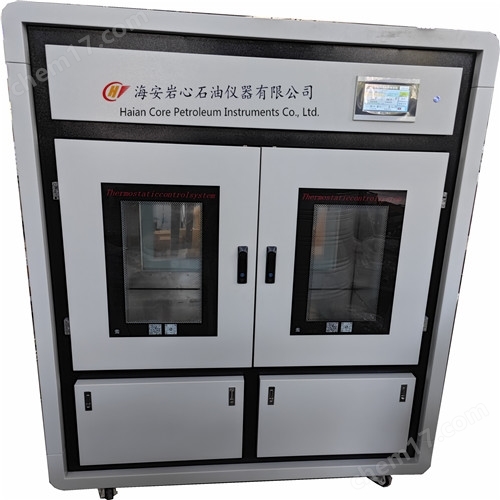


Single link automatic control constant temperature box
NegotiableUpdate on 07/01
- Model
- Nature of the Manufacturer
- Producers
- Product Category
- Place of Origin
Overview
SG-3 type self-control constant temperature oven: The SG-3 series electric constant temperature drying oven has a beautiful and practical volume. The outer shell is made of high-quality steel plates welded together, surface sprayed, and the inner chamber is made of stainless steel plates. The plate insulation is made of ultra-fine glass wool, and the box door is equipped with a glass observation window. The working room and the box door are sealed with heat-resistant silicone rubber or asbestos rope insulation. The power switch, temperature controller and other operating components of the drying oven are concentrated in front of the box for easy operation.
Product Details
SG-3 typeSingle link automatic control constant temperature box
1main data、
model |
SG-3 |
Interior dimensions |
1297*850*762 |
temperature range |
room temperature~120℃ |
temperature fluctuation |
±1℃ |
power supply voltage |
380VThe50HZ |
power consumption |
4000W |
IIStructural Overview
SG-3Type series electric constant temperature drying oven capacityJi JuBeautiful and practical. The outer shell is made of high-quality steel plates welded together, surface sprayed, and the inner chamber is made of stainless steel plates. The plate insulation is made of ultra-fine glass wool, and the box door is equipped with a glass observation window. The working room and the box door are sealed with heat-resistant silicone rubber or asbestos rope insulation. The power switch, temperature controller and other operating components of the drying oven are concentrated in front of the box for easy operation.
The heating and constant temperature system inside the box is composed of an electric heater, a temperature controller, a fan, and a suitable air duct structure. whenStart workWhen the power is turned on, the fan works simultaneously to discharge the heat generated by the electric heater through the air duct, dry the items in the working room, and then suck them into the fan, so as to continuously circulate and achieve uniform temperature.
The temperature controller is a microcomputer intelligent digital temperature controller that uses progressive heating to minimize temperature overshoot. It has a self-tuning function and high temperature control accuracy. The set temperature is equipped with a protective device and also has a tracking alarm function.
1Usage
Equipment power connection This instrument is a three-phase five wire system Three fires and one ground
1Put the dried items into the studio, close the box door, and then turn on the power.
2After pressing the blue device main power button, the temperature controller will power on and display. Click to enter the system and display the control system. Click on the temperature setting to enter the temperature setting interface. This device's temperature controller is a multi-stage temperature control system that can set the temperature and insulation time step by step to achieve stable control of the working temperature inside the constant temperature box. After setting, click to return to the main interface, click to start, and the constant temperature box starts to work and heat up (check whether the forward and reverse rotation of the circulating fan motor is correct, if it is reversed, adjust the phase of any two of the three live wires of the main power supply). Click on lighting, and the explosion-proof lamp inside the constant temperature box starts to light up.
3Open the box door, put the required items into the box, and close the box door. If the door is opened for too long and the temperature inside the box fluctuates, this is a normal phenomenon.
4During the drying period of items, it is best not to open the box door unless the items are placed or taken out of the box to avoid affecting the temperature.
5When the required working temperature is low, a secondary setting method can be used to reduce or eliminate temperature overshoot, allowing the studio to enter constant temperature as soon as possible.
6Choose the drying time as needed, and after the drying is complete,Click on the touch screen to stop workingIf you don't take out the item immediately, be careful not to get your hands hot. You can open the box door first and lower the temperature inside the box.
3Open the box door, put the required items into the box, and close the box door. If the door is opened for too long and the temperature inside the box fluctuates, this is a normal phenomenon.
4During the drying period of items, it is best not to open the box door unless the items are placed or taken out of the box to avoid affecting the temperature.
5When the required working temperature is low, a secondary setting method can be used to reduce or eliminate temperature overshoot, allowing the studio to enter constant temperature as soon as possible.
6Choose the drying time as needed, and after the drying is complete,Click on the touch screen to stop workingIf you don't take out the item immediately, be careful not to get your hands hot. You can open the box door first and lower the temperature inside the box.
5、 Precautions
1The outer shell of the drying oven must be effectively grounded to ensure safe use.
2The drying oven should be placed indoors with good ventilation conditions, and flammable and explosive materials should not be placed around it or inside the box.
3The items inside the box should not be placed too tightly, and space must be left.
4The inside and outside of the box should be kept clean regularly, and if not in use for a long time, it should be covered with a plastic dust cover and placed in a dry room.
6、 Fault handling
now elephant |
original because |
place reason |
1No power supply |
1The plug is not properly inserted or disconnected 2Open circuit of fuse |
1Insert the plug or connect the wire properly 2Replace the fuse |
2The temperature inside the box does not rise |
1Set the temperature to low 2The electric heater is broken 3The temperature controller is broken 4The fan is broken |
1Adjust the set temperature 2Replace the electric heater 3Replace the temperature controller 4Ventilation fan |
3There is a significant difference between the set temperature and the temperature inside the box |
1The temperature sensor is broken 2The temperature adjustment potentiometer has not been properly adjusted |
1Replace the temperature sensor 2Adjust and fine tune the potentiometer |
4Abnormal over temperature alarm |
1Set the temperature to low 2The temperature controller is broken |
1Adjust the set temperature 2Replace the temperature controller |

