- Phone
-
Address
Building 2, No. 64 Tiancheng Road, Jianggan District, Hangzhou City, Zhejiang Province
Product Categories
Hangzhou Hangrui Electric Power Automation Co., Ltd
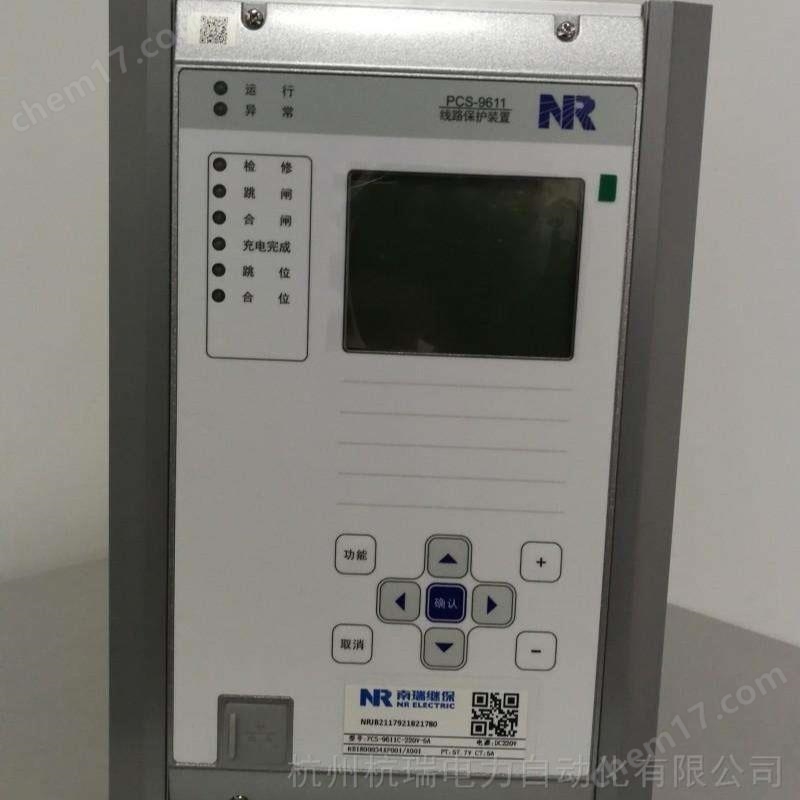


Nanjing NARI RCS9611CS relay protection device
NegotiableUpdate on 05/14
- Model
- Nature of the Manufacturer
- Producers
- Product Category
- Place of Origin
Overview
The Nanjing Nanrui RCS9611CS relay protection device does not provide a separate reset button. Pressing the 'confirm' button on the main screen can achieve the reset function. In the main screen state, press the '▲' key to enter the main menu, and use the '▲', '▼', 'confirm', and 'cancel' keys to select submenus.
Product Details
Nanjing NARI RCS9611CS relay protection device
6.1 Device tuning
The buttons' ▲ 'and' ▼ 'are used to scroll and select the desired constant value to be modified. The buttons' ◄' and '►' are used to move the cursor to the desired position for modification. '+' and '-' are used to modify data. The button 'Cancel' is used to abandon the modification and return. Press the 'Confirm' button to complete the constant value setting and then return.
Note: No password is required to view the fixed value. If you want to modify the fixed value, you need to enter a password. If the password is incorrect, there will be a prompt message.
6.2 Status Display
This menu is mainly used to display the real-time sampling values and switch status of the current and voltage of the protection device, which comprehensively reflects the operating status of the device. Only when the displayed values of these quantities are consistent with the actual operating conditions, can the protection work correctly. Suggest checking these quantities during operation.
6.3 Report Printing
This menu is mainly used to select printing content, including parameters, settings, trip reports, operation reports, self check reports, remote signaling reports, status, and waveform printing.
The report printing function can facilitate users to verify fixed values, view device status, and analyze accidents.
In the event of an accident, it is recommended that users properly preserve the original information on site, print and save the device's settings, parameters, and all reports for post analysis and responsibility definition.
6.4 Time Setting
Display the current date and time.
The buttons' ▲ ',' ▼ ','<', and' ► 'are used to select and modify objects, while'+'and' - 'are used for modification. Pressing 'Cancel' means abandoning the modification and returning, while 'Confirm' means executing the modification and returning.
6.5 Report Display
This menu displays trip report, operation report, remote signaling report, operation report, and self-test report. This device has a power-off hold function, which can remember the latest 64 reports (256 remote signaling reports) regardless of whether the power is cut off or not. The display format is the same as "6.2 LCD Display Description". The latest report is displayed first. Press the '▲' button to show the previous report, press the '▼' button to show the next report, and press the 'Cancel' button to exit the previous menu.
Nanjing NARI RCS9611CS relay protection device
6.6 Report Clearing
Select the notebook menu, enter the correct password, and implement the report clearing function.
Attention: Please do not use this function arbitrarily. Before the device is put into operation, this function can be used to clear the report generated by the transmission test. If the system malfunctions, the device triggers an exit, or there is an abnormal situation after the device is put into operation, it is recommended to first properly store the device's report information (the information held in the device and the information in the monitoring background can be printed or copied), and then clear it.
6.7 Device Testing
The auxiliary debugging function is used for manufacturer production debugging or on-site inspection of communication and export circuits, which can reduce the workload and shorten the debugging time. The testing content includes remote signaling point-to-point, remote telemetry setting, and outlet transmission. All tests are password protected, and the device records these operations for post analysis.
This function can generate export, remote signal displacement messages, and telemetry data, and should be used with caution.
1) Remote signaling point-to-point function
This function is mainly used for generating virtual remote signals locally, and communication jumping can be carried out without the need for protection testing. There are two methods for remote signal point-to-point testing: the "Remote Signal Sequence Test Menu" and the "Remote Signal Point Selection Test Menu". The former uses automatic point selection in sequence, while the latter uses manual point selection. Both can generate displacement reports for all remote signaling points such as action components, alarm information, protective pressure plates, and remote signaling inputs. The generated reports are both retained on site and uploaded. The specific operation method is as follows:
After entering the "Remote Signaling Sequence Test Menu", the remote signaling status of the device automatically shifts from top to bottom according to the remote signaling quantity items displayed on the LCD interface, and a corresponding remote signaling displacement report will be generated. After the remote signaling automatic point-to-point function is completed, the remote signaling test menu will automatically exit.
After entering the "Remote Signal Selection Test Menu", the user presses the "▲" or "▼" keys to browse and view. The cursor stops at the line of the remote signal point that needs to be tested, and the "OK" key is pressed to perform the remote signal selection test. After the test is completed, the user can press "Cancel" to exit the menu or continue selecting other remote signal points for the test.
2) Remote telemetry setting function
Used for remote telemetry data numerical verification, enter the "Telemetry Signal Test" menu, manually set the telemetry data, and check whether the remote telemetry data is consistent with the local display.
Enter the "Telemetry Signal Test" menu, and the user can browse and view by pressing the "▲" or "▼" keys. The cursor will stop at the line where the telemetry measurement needs to be tested. Press the "OK" key to perform the telemetry signal test. After the test is completed, the user can press "Cancel" to exit the menu or continue browsing the telemetry items and conducting the test.
3) Export transmission test
This function can be used for on-site circuit inspection and can trigger the outlet contact without the need for protective testing. All outlet contacts of the device can be driven through the "Export Transmission Test" menu.
Special note: When using the export transmission test function, the maintenance pressure plate (terminal 330) of the device must be engaged and the device must be in a state of no pressure or flow.
Enter the "Export Transmission Test" menu, and the user can browse and view by pressing the "▲" or "▼" keys. The cursor will stop at the row where the export item to be tested is located, and the "OK" key will be pressed to perform the corresponding export transmission test. After the test is completed, the user can press "Cancel" to exit the menu or continue browsing the export item and conducting the test.
Version 6.8 Information
The LCD interface of the device can display the program name, version, verification code, and program generation time. The specific version information is displayed as follows (taking RCS-9611CS as an example):
Protect program version information
Device model, if there is a 6-digit program version after a special program
The machine code of the program and the time it takes for the lower sixteen bits of the program to form
Communication program version information
Device model, if there is a 6-digit program version after a special program
The machine code of the program and the time it takes for the lower sixteen bits of the program to form
Version information content is a symbol recognized by program management.
Similar Product Recommend