- Phone
-
Address
No. 1833, Building D, 4299 Jindu Road, Minhang District, Shanghai
Product Categories
Shanghai Qianshi Precision Electromechanical Technology Co., Ltd
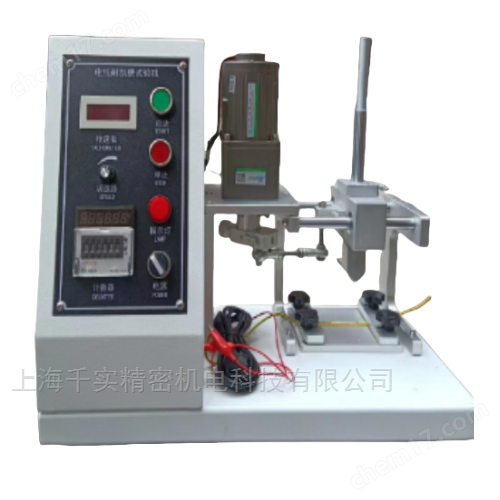
Wire and cable scratch resistance tester
NegotiableUpdate on 05/06
- Model
- Nature of the Manufacturer
- Producers
- Product Category
- Place of Origin
Overview
The wire and cable scratch resistance tester is a device used to scratch the insulation surface of wires. It scrapes the insulation surface back and forth along the axial direction of the sample, and automatically stops when the scraping needle penetrates the insulation and contacts the conductor. This testing machine complies with ISO6722, QC/T730, JB/T8139, JASO D611, DIN72551, VW60306 testing standards.
Product Details
Product Usage
Wire and cable scratch resistance testerA device used for scraping and grinding the insulation surface of wires, which moves back and forth along the axial direction of the sample to scrape and grind the insulation surface. When the scraping needle penetrates the insulation and contacts the conductor, it automatically stops.
This testing machine complies with ISO6722, QC/T730, JB/T8139, JASO D611, DIN72551, VW60306 testing standards.

Wire and cable scratch resistance testerTechnical parameters:
1. Scraper stroke: 10-20mm
2. Scratching length: 15.5mm
3. Scratching speed: 50-60 times/minute (one back and forth movement counts as one time)
4. Scratching force (equipped with weights): 500g2, 750g1, 714g1
400g, 300g, 600g, 700g, 800g, 900g, 1100g each
5. Scratch count: 1~99999 times, set arbitrarily
6. Motor: 1/2HP Taiwan, China motor
7. Transmission mechanism: It is a ball guide rail
8. Control part: composed of counting, starting, stopping, speed regulation, and power switch functions.
9. The control box is coated with electrostatic paint
10. The transmission mechanism is electroplated after precision machining
11. Weighting method: using weights to increase weight
12. Scraper and scraper needle curvature radius: 0.25, 0.45, 0.125
Instructions for operation:
1. Place the test object in the V-shaped groove of the sample base platform of this instrument, rotate the two side clamping fixture handle to make the sample flat and secure. (The length of the test object should be 750mm.)
2. Open the limit card of the scraper needle bracket to make contact between the scraper needle and the sample, and select the corresponding weight according to the standard testing requirements. (To open the bracket limit card, one should hold the guide rod with one hand and gently lower it to come into contact with the surface of the tested object to prevent affecting the test results.)
3. Connect the test object to the output terminal of this instrument, turn on the power switch, and start the testing machine.
4. When the conductor inside the tested object comes into contact with the scraper needle, the instrument automatically shuts down. Pick up the scraper bracket and secure it with the upper limit clip. Move the test object 120-150mm, flip it 90 degrees, and re fix it for testing. Repeat 4 times for comparison, and refer to the standard requirements to determine whether it is qualified.
5. Control settings:
The up arrow key controls the selection of the C, E, F, and U letter files on the left side of the LED display. The letters represent the following meanings:
C: Scratching and counting
E: Reciprocal of set value
F: Set the number of shutdown scraping times
U: Set value
Press the left and right arrow keys together to enter the setting adjustment. Adjust the numerical value with the left and right arrow keys, and adjust the shift with the up arrow key. After the adjustment is OK, press the up arrow key and the left and right arrow keys at the same time to complete the setting. Modify by pressing the left and right arrow keys at the same time, and select the mode with the up arrow key!
Similar Product Recommend
