- Phone
-
Address
5th Floor, Building 2, No. 518 Fuquan North Road, Changning District, Shanghai
Product Categories
Leica Microsystems (Shanghai) Trading Co., Ltd

Visoria B Laboratory Microscope
NegotiableUpdate on 07/07
- Model
- Nature of the Manufacturer
- Producers
- Product Category
- Place of Origin
Overview
The Visoria B laboratory microscope is suitable for various life science research, including human and animal histology, plant anatomy, and pathological examination. Using various observation methods such as bright field, dark field, phase difference, differential interference contrast, and four-color fluorescence, reveal the subcellular structure of tissues and samples. Visoria B has also been certified for in vitro diagnostics (IVD).
Product Details
Experience higher efficiency and comfort in daily microscope operations. The Visoria B laboratory microscope is suitable for life sciences and clinical laboratories.
The use of encoding features, optimized light intensity settings, and other microscope functions can improve the efficiency of your workflow. In addition, the ergonomic design of the microscope allows you to work more comfortably and minimize strain.
Efficiently and comfortably complete daily operations
Visoria B Laboratory MicroscopeThe benefits:

Improve efficiency through encoding functionality
Save valuable time by simplifying document recording and coding microscope functions, allowing you to focus on the sample.

Adopting ergonomic design for more comfortable use
Use symmetrically arranged controls and ergonomic accessories to work in a comfortable posture.

Driven by Enersight
Using Visoria B laboratory microscope and Enersight software platform can simplify and make your workflow more efficient.
knowVisoria B Laboratory Microscope
Used for life sciences and clinical laboratories
The Visoria B laboratory microscope is suitable for various life science research, including human and animal histology, plant anatomy, and pathological examination. Using various observation methods such as bright field, dark field, phase difference, differential interference contrast, and four-color fluorescence, reveal the subcellular structure of tissues and samples. Visoria B has also been certified for in vitro diagnostics (IVD).
The Visoria B laboratory microscope has been certified for in vitro diagnostics (IVD).
Save time through optimized light intensity settings
By using Visoria B, you can have more time to observe and inspect the samples.
If you change the magnification or observation mode of the microscope, there is no need to manually adjust the brightness, as it has a light intensity management function. Thanks to the encoding function of the microscope, the lighting settings will be automatically applied.
Observe the sample under ideal lighting conditions without adjusting the intensity settings of the microscope.
Simplify the process of document recording
You only need to press a button to quickly capture sample details, while keeping your eyes fixed on the image. The image acquisition button on the Visoria B microscope stand is within reach.
When you store images for document recording, the selected system settings are automatically saved along with the source data of the images.
The scale bar will automatically adjust and be added to the image, thereby improving efficiency and saving your valuable time.
Simply press a button on the microscope stand to capture images, saving time and effort.
Easy operation of microscope
Visoria B is intuitive to operate and can quickly and reliably complete daily tasks.
By color coding, it is easy to find the appropriate aperture for each objective lens.
Built in focusing limit device can protect the sample and objective lens from accidental damage.
To achieve more fine focusing at higher magnification, please use the three gear focusing system - coarse, middle note and fine.
In addition, Visoria B also provides a standard protection mode that automatically turns off lighting after capturing images.
The microscope adopts a silver treated antibacterial surface, which can maintain a clean and hygienic working environment and reduce the risk of bacterial transmission.

The aperture stop scale on the spotlight has color markings that match the color code of the objective lens.
Using a digital microscope to achieve eyepiece free operation
The Visoria B digital laboratory microscope without an eyepiece has many practical advantages:
View images directly on the tablet and work in a comfortable and relaxed position.
Quickly present and document work steps, and easily discuss image results with colleagues.
No need for a computer, saving workspace.

The user is operating the Visoria B digital laboratory microscope.
Maintain comfort during work
Visoria B can adapt to your needs, allowing you to maintain the correct posture during prolonged use of the microscope and reducing the risk of neck and back strain.
The focus and stage control knobs adopt a symmetrical layout and adjustable height, so you can keep your shoulders level, and the hand and arm posture conforms to ergonomics, making it easy and comfortable to work. You can operate Visoria B with one hand.
Easy switching between right-hand and left-hand operation, especially useful when sharing a microscope with other users.

Users can maintain a comfortable posture while using Visoria B.
Adjusting the microscope with ergonomic accessories
Thanks to the excellent adaptability of Visoria B, you are able to maintain a straight posture. You can choose from a range of ergonomic accessories to meet your needs.
Ergonomic eyepiece tube: You can choose a 15 ° ergonomic eyepiece tube or an adjustable VarioTube (tilt angle 0-35 °) to maintain a relaxed head posture while obtaining flexible viewing angles.
Ergonomic eyepiece tube angle module: Inserting ErgoModule below the eyepiece tube can adjust the height of the eyepiece, allowing for comfortable sitting posture during work.
Ergonomic adjustment plate: The optional ErgoLift adjustment plate can easily adjust the height of the microscope.
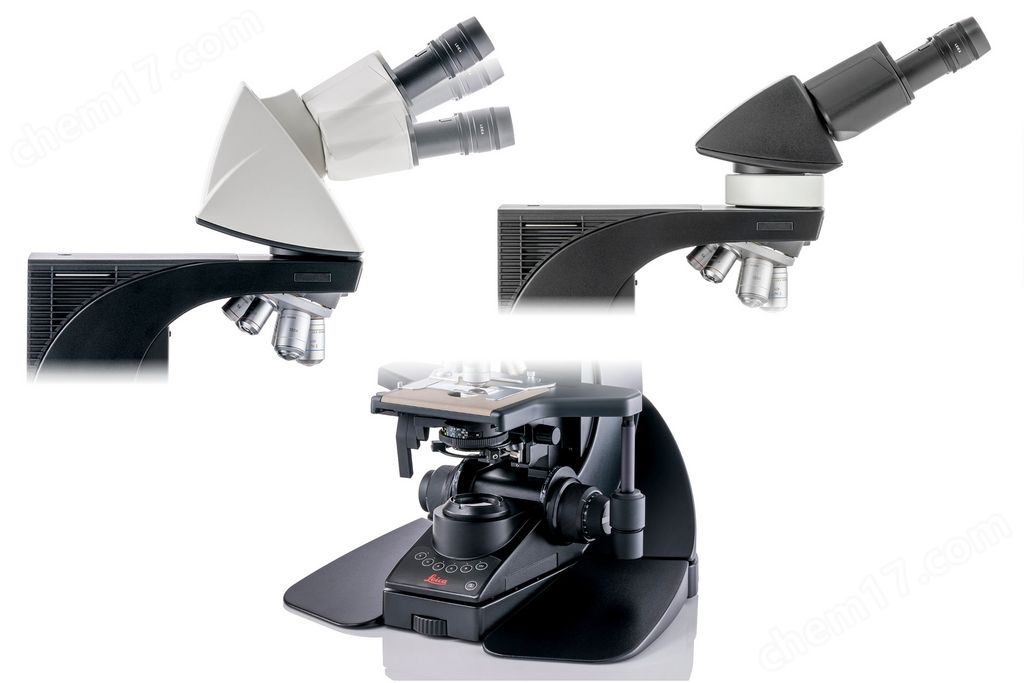
Flexible adjustment of eyepiece observation angle and height, as well as the overall height of the microscope.
Reduce repetitive actions to minimize strain
Do you need to work in front of a microscope for a long time? Using Visoria B can reduce the risk of physical discomfort and repetitive strain injuries. Minimize repetitive actions by adjusting the height and torque of the stage and focusing controls.

The XY stage position and focusing knob are easy to operate and can be adjusted with one hand.
Driven by Enersight software platform
Using Visoria B laboratory microscope and Enersight software platform can simplify and make your workflow more efficient. It provides an intuitive interface to help you seamlessly compare, measure, and share data.
Important advantages
Optimize images by automatically correcting shadows caused by uneven lighting.
Use the quick brightness adjustment function to capture high-quality images with ideal lighting and camera parameters.
Use the Depth of Field Extension (EDOF) feature to capture clear images.
Use the XY stitching function of the manual stage to observe samples with a larger field of view and higher resolution.
By merging images of up to four fluorescence channels, a rich overlay image can be obtained.
Merge multiple images obtained from different observation methods (such as bright field and fluorescence) to better understand the sample.
Present multiple targets in a single sample and use fluorescence to provide a comprehensive view of tissue morphology and pathology.
Compatible with TWAIN
TWAIN is a communication protocol between software and some Leica microscope cameras. By using this protocol, you can also use the software of your choice for post-processing of images.
The TWAIN function of the camera can be used to control the camera, capture images, and transfer image data to different repositories for analysis and archiving. You can easily store images in laboratory or hospital information management systems.
Similar Product Recommend


