- Phone
-
Address
Jinbolong Industrial Zone, No.1 Huayun Road, Yucui Community, Longhua Street, Longhua District, Shenzhen City
Product Categories
Shenzhen Iris Instrument Co., Ltd


Thermogravimetric Moisture Analyzer
NegotiableUpdate on 05/06
- Model
- Nature of the Manufacturer
- Producers
- Product Category
- Place of Origin
Overview
The ARS-SF10 thermogravimetric moisture detector produced by Shenzhen Iris is easy to operate, does not require installation, debugging, or training, and can be used simply by unpacking; Color touch capacitive screen design, real-time display of sample status, one click moisture measurement design, automatic shutdown and display of moisture content. Drying method moisture detector, drying weight loss method moisture detector, infrared moisture detector
Product Details
ARS-SF10 produced by Shenzhen IrisThermogravimetric Moisture AnalyzerBy using halogen heating system and insulated weighing sensor technology, rapid heating, precise temperature control, and weighing can be achieved. The test readability reaches 0.01%/1mg, with fast testing speed and accurate results. Parameters and conditions can be set directly through the 5-inch touch LCD screen, achieving human-machine integration operation. It also comes with curves for real-time monitoring of testing progress and has the function of connecting with computers and printers. Generally, the product can measure the results in a few minutes and automatically lock the final value, without the need for personnel supervision. The results are accurate and consistent with the oven experiment, greatly reducing the operator's time. The testing principle of the Iris rapid moisture analyzer meets GB/T29249-2012 electronic weighing drying method moisture analyzer.
Product Features:
1.5-inch touch screen, easy to read and operate
2. Two heating methods to choose from: halogen lamp, infrared
4. Temperature increment: 1 ℃
5. Heating time setting: 0-99 minutes (increasing by 1 minute)
6. Shutdown and endpoint judgment mode: automatic/timed/manual
7. Heating ends, buzzer prompts
8. Multiple display results: sample weight before drying (G), sample weight after drying (residual weight, g), water loss rate/moisture content (1g/G), drying rate (g/G), moisture regain rate (G/g-1), wet weight rate (G/g), as well as heating method, heating temperature, heating time, etc
9. Calibration: External weight calibration,
10. Communication interface: RS232 interface, etc
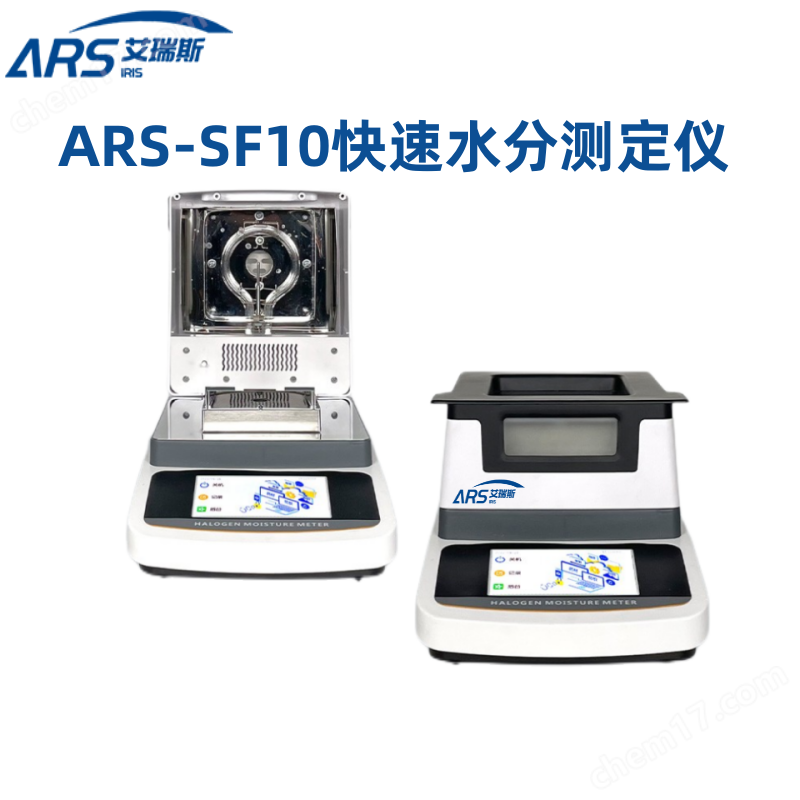
ARS-SF10Thermogravimetric Moisture AnalyzerTechnical data:
1. Display mode: 5-inch full-color touch display
2. Weighing range: 0-110 g
3. Instrument accuracy: 0.001 g
4. Sensor: Electromagnetic force sensor
5. Language mode: Switch between two language modes: Chinese and English
6. Heating source: high-efficiency annular halogen lamp heating
7. Temperature range: 40 ℃ -160 ℃
8. Temperature adjustment: 1 ℃
8. Test range 0.00% -100.00%
9. Moisture readability: 0.01%
10. Time setting: 1~99 minutes
11. Test mode: Standard/Fast/Soft
12. Shutdown mode: automatic/manual/timed
13. Instrument calibration modes: single point calibration, linear calibration
14. Test mode: Set up storage for 20 different test modes
15. Storage records: 20 sets
16. Curve: Real time dynamic curve
17. Sample tray: 100mm
18. Environmental temperature: 5 ℃ -35 ℃
19. Display data: can view moisture percentage, dry weight percentage, wet weight percentage and other data
20. Baud rate: set to 1200/2400/4800/9600
21. Configure RS232 serial port for easy connection to printers, computers, and other peripheral devices
22. System settings: The instrument (time and date) (touch calibration) (system restoration) can be set
23. Input voltage: 220V 50Hz/110V 60Hz
24. Product size: 336X215X166mm
25. Packaging size: 415 * 310 * 255mm
26. Gross net weight: 3.5kg/2.6kg
Moisture meter testing steps:
1. Set the heating method
2. Set the heating temperature
3. Set shutdown mode (shutdown time, automatic shutdown weight loss rate)
4. Prepare test samples
4.1 Place the empty sample tray on the tray holder,
4.2 Press the 'Peel' button to remove the weight of the sample tray
4.3 Take out the sample tray and put in the sample. The sample should be larger than 0.5g
4.4 Uniformly distribute the samples on the sample tray
4.5 Place the sample tray containing the sample back onto the rack, and the display screen will show the weight of the sample
5. Close the heating chamber
6. Press the [Start] button to start measuring
7. The display screen shows the current weight value. Press the [Unit Conversion Key] to convert the current measurement result
8. After the measurement is completed, the display screen shows the moisture content of the sample. Press the [Peel] button to return to the normal weighing mode
9. Press the 'Print' button to send the current measurement result to the printer or other peripheral device.
Note: At any time during the testing process, you can press the 'Stop' button to terminate
after-sales service
One year free warranty, lifetime maintenance;
7-day no reason return and exchange, 24-hour instant response;
One on one technical guidance, allowing you to have no worries after purchasing;
Similar Product Recommend