-
Phone
13601876858
-
Address
10th Floor, Smart Gold Tower, Building 1, Fudan Industrial Park, 588 Longchang Road, Yangpu District, Shanghai
Product Categories
Shanghai Gaozhi Precision Instrument Co., Ltd

Surface roughness meter, spray anti-corrosion sand eye meter, anchor pattern meter
NegotiableUpdate on 02/28
- Model
- Nature of the Manufacturer
- Producers
- Product Category
- Place of Origin
Overview
Surface roughness meter, spray anti-corrosion sand mesh meter, anchor pattern meter, surface roughness meter, spray anti-corrosion sand mesh meter, anchor pattern meter
Product Details

MW0918 Surface Roughness Meter Spray Anti corrosion Sand Mesh Meter Anchor Pattern Depth Meter Sandblasting Shot Blasting Roughness Measuring Instrument Product Usage:
The MW0918 surface roughness meter (digital surface roughness profiler) can directly measure the height of the peak valley of the surface, and is suitable for use in industries such as printing, shot blasting, and spray anti-corrosion that require surface roughness!

MW0918 Surface Roughness Meter Spray Anti corrosion Sand Mesh Meter Anchor Pattern Depth Meter Sandblasting Shot Blasting Roughness Measuring Instrument Technical Parameters:
|
measurement range |
6.5mm |
|
resolution |
0.001mm |
|
MAX large indication error |
0.006mm |
|
Battery usage time |
1.5V button battery (SR44) can be used for 8-12 months |
|
Operating Temperature |
0℃--+40℃ |
|
Storage temperature |
-10℃--+60℃ |
|
relative temperature |
<80% |
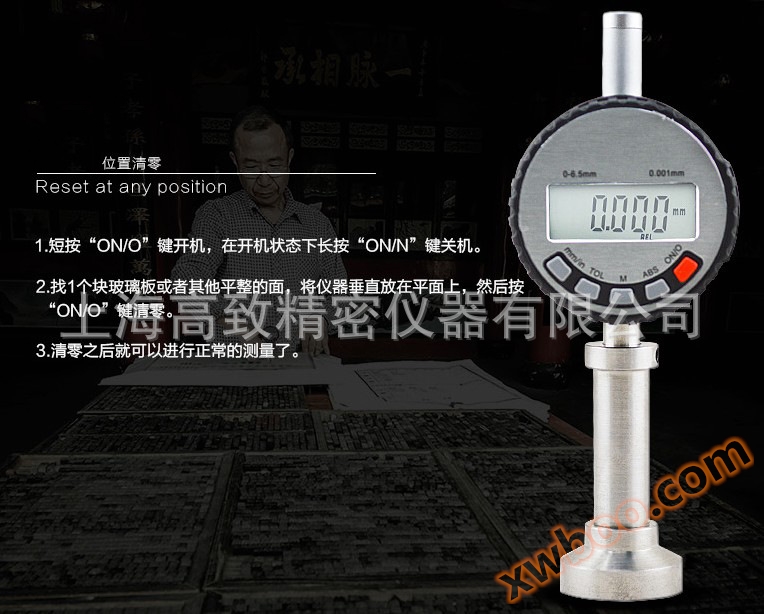


MW0918 Surface Roughness Meter Spray Anti corrosion Sand Mesh Meter Anchor Pattern Depth Meter Sandblasting Shot Blasting Roughness Measuring Instrument Performance Features:
Position conversion from metric to imperial system
data retention
Quickly track MIN/MAX values
Tolerance value discrimination
Position reset
The use and functions of other keys:
1. The metric to imperial conversion key (mm/inch) can be used to convert between mm and inch
2. Use of Function Key (M)
A. HOLD: Press this key briefly to keep the measured data unchanged, then press it again to switch to normal settings.
B. Quickly track MAX value: Press and hold this button until "MAX" is displayed. During testing, the displayed value is the MAX value during the measurement process. Press this button again to reset to the current measurement value and start a new measurement. After using this function, long press this key to display "MIN", long press this key again to display "△", and then long press this key again. The last line on the display screen disappears, indicating that it has entered the normal measurement state.
C. Quickly track MIN value: Similar to quickly track MAX value.
D. Quick follow-up difference (△): In the measurement state, repeatedly press and hold the M key until △ is displayed, and the displayed value will automatically reset to zero. When measuring, it will be displayed as the difference between MIN/MAX values.
3. The tolerance setting key (TOL) and value measurement key (ABS) are additional function keys that are temporarily not used.
4. Battery installation: Open the battery box cover, remove the old battery, insert the new battery (with the negative pole facing outward), and then put the battery box back in place. If the newly purchased instrument has unclear characters, flashes, or does not display, it may be due to a long factory time. Simply replace the battery.
Similar Product Recommend


