- Phone
-
Address
Room 213, Hepingli Business Building, Dongcheng District, Beijing
Product Categories
Beijing Guohua Jiaxin Technology Co., Ltd
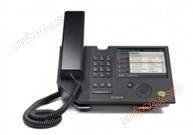
Polycom CX700- Polycom Video Conference
NegotiableUpdate on 06/18
- Model
- Nature of the Manufacturer
- Producers
- Product Category
- Place of Origin
Overview
The excellent choice for the supervisor's desktop is to personalize the CX700 according to personal preferences using a biometric fingerprint scanner or on-screen keyboard. Accessing voicemail; Insert a microphone into the standard RJ-9 jack; Input through on-screen keyboard; Connect the computer to the onboard Ethernet port; View the availability information of contacts on the screen.
Product Details
Polycom CX700 Desktop Phone
FEATURES AND BENEFITS

Product Description:Excellent choice for supervisor desktop suitable for occasions: supervisor desktop


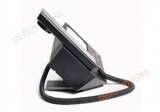


Whether in earpiece, hands-free, or headphone communication mode, the Polycom CX 700 can provide you with incredibly clear, natural, and unrestricted calling experience. Its broadband, high fidelity sound quality, and advanced noise cancellation and echo suppression functions ensure that your call process is as natural and friendly as if you were face-to-face with the other party.
Fully integrated with Office Communications Server 2007
Embedded client allows for making calls and accessing personal contact information or other advanced features without the need for a PC.
Unparalleled sound quality
High definition broadband audio achieves optimal voice call quality in earpiece, full duplex hands-free speaker, and headphone modes.
Personalization
Customize the CX700 according to personal preferences using a biometric fingerprint scanner or on-screen keyboard.
Easy call management
Call monitoring and management through a touch screen interface based on Microsoft Windows CE. Click to call function, where users can call by clicking on a name in their contact list or call history. Enhanced caller information allows users to quickly decide how to handle incoming calls.
Enhanced online status display
Screen online status display, indicating the online status of each contact of the user. The online status can be set through the touch screen, and there is a bright LED large screen to display its current online status.
Ultimate flexibility
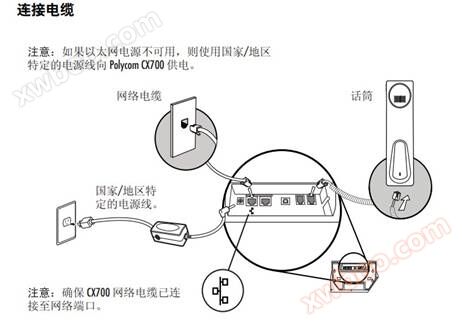
Use CX700 in the most convenient way: access voicemail; Insert a microphone into the standard RJ-9 jack; Input through on-screen keyboard; Connect the computer to the onboard Ethernet port; View the availability information of contacts on the screen.

Attributes key 3x4 telephone dial (0-9, A-Z, *, #); Call/hang up button; Hands free button; Mute button; Volume control button; Help button; Selection button for touch dial; fingerprint reader speaker Frequency response: 30-20kHz LED indicator light Hanging status indicator light; Voice information status indicator light; Call waiting status indicator light; Multi color online status indicator light display 5.7 Color LCD screen; Touch panel; Backlight; 320x240 resolution network interface 2 RJ45 interfaces for 100Mbps Ethernet 10/100Base-T Auxiliary interface USB interface Ear microphone interface RJ 9 interface Answer mode Supports three modes: hands-free, controller, and headphone power supply IEEE 802.3af, Built in Ethernet power supply CODEC RTAudio、G.722.1、G.711A、G.711u、ILBC language support the Chinese Audio Characteristics Automatic Gain Control (AGC); Dynamic noise cancellation; Echo cancellation function Integration Feature Microsoft Skype 2010 companion product with built-in Skype client Device Attributes Audio equipment
Similar Product Recommend